MG-Select Helper
It is a tool window that stores your temporary selection and serves as a selection assistant.
You could have any number of select helper windows opened at the same time.
To bring up a new helper window, you have two ways:
LMB clickon the top right button, select
 New Selection Helper.., selectNew Selection Helper...CTRL / SHIFT RMB clickingon a select-button, the member view will pop up, click on the tear-off button at the bottom right corner to tear the window off, and make it into a select helper window.
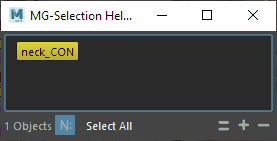
Use the
=button to replace the content with the Maya selection,+to add the Maya selection to the window, and-to remove the Maya selection from the window.Press the
Select Allbutton to select all the member objects in the select buttons in the view, hold theCtrlkey while pressing it to deselect the members,Ctrl+Shiftkey to add members to the current selection, and Shift to invert the selection.Toggle on / off the
NSto toggle the display of the namespace in the view.